Launching a mobile app is only half the battle; the real challenge lies in getting it into the hands of the right users.
This comprehensive guide breaks down the actionable steps to build a sustainable app marketing strategy for founders, app marketers and user-acquisition managers. It helps teams connect marketing spend with measurable growth outcomes, and ends with a channel table, a launch checklist and a 90-day plan.
What Is Mobile App Promotion?
Mobile app promotion is the combined work of making an app discoverable in the stores, buying qualified users through paid channels, building owned channels such as a website and email, and keeping the users you acquire. It covers five areas, and each one depends on the others:
The difference between mobile app marketing and web marketing is structural, and it comes down to three things:
The Three Stages of App Marketing
Most teams treat promotion as something that begins on launch day. In practice, the work splits into three stages, and the decisions made in the first one determine how much the second and third cost.
Pre-launch: validate audience, positioning and store assets
What should I do before launching an app? Validate that a specific audience has the problem your app solves, write the positioning that will appear on the store page, prepare metadata and creative assets, and install your attribution SDK and event tracking before any budget is spent. A launch with no measurement in place produces installs you cannot evaluate.
Concretely, the pre-launch work covers:
On Google Play, you can also run a pre-registration campaign to gauge demand before release.

Launch: acquire the first qualified users
The goal at launch is not volume. It is a first cohort clean enough to tell you which audiences activate and which do not. That means a small number of channels, a defined test budget per channel, and creative variants that differ on one dimension at a time.
Launch is also when store conversion is under the most pressure: your traffic mix is unfamiliar and your review count is low. Do not read early cost per install as a permanent benchmark.
Post-launch: retention, referrals and iteration
After the first weeks, the constraint shifts from acquisition to what happens after it. If day-7 retention is weak, additional spend simply buys a larger leaky cohort. Work on the activation step first — the moment a user reaches the value your app promised — then on the repeat behaviour that follows it.
This is also the stage where referrals, lifecycle messaging and store assets compound. Ratings improve as retained users are prompted at the right moment, and better ratings raise conversion for every channel you run.
Start with a Promotion Strategy, Not a Channel List
What is the best way to promote a mobile app? There is no single best channel. The best approach is to define the audience, choose one conversion event that represents real value, and select channels that can both reach that audience and be measured against that event. A channel list without a measurement plan produces spend you cannot judge.
Define the audience and the core job-to-be-done
Write the audience as a job rather than a demographic. “Women 25–34” is not actionable. “People who track shared expenses on trips and currently use a spreadsheet” tells you which keywords to target, which screenshots to design and which creators to approach.
This definition also decides your channel mix. An app that solves a searched-for problem belongs in store search and Apple Ads. An app that solves a problem people do not search for needs discovery channels — social, creators, in-app networks — where you create demand rather than capture it.
Set the conversion event and target KPI
Pick the single event that proves a user received value. What that event is depends on the model:
Everything upstream of that event is a proxy.
Then set the target you can defend commercially: a cost per that event, not a cost per install. Installs are the easiest number to buy and the least connected to revenue.
Build a measurement plan before spending budget
Four decisions have to be made before launch, not after:
Retrofitting this after a month of spend usually means discarding that month of data.
Optimize the App Store and Google Play Listing
What is the difference between ASO and paid app promotion? ASO improves how your listing ranks and converts, and its effect compounds without ongoing media spend.
Paid promotion buys traffic to that listing and stops when the budget stops. They are not alternatives: paid traffic still lands on your store page, so weak assets raise the cost of every campaign you run.
Keyword research and positioning
The two stores index differently, so the same research produces two different outputs.
Start from the language in reviews of competing apps, not from a keyword tool alone: users describe problems in words that rarely match internal product vocabulary.
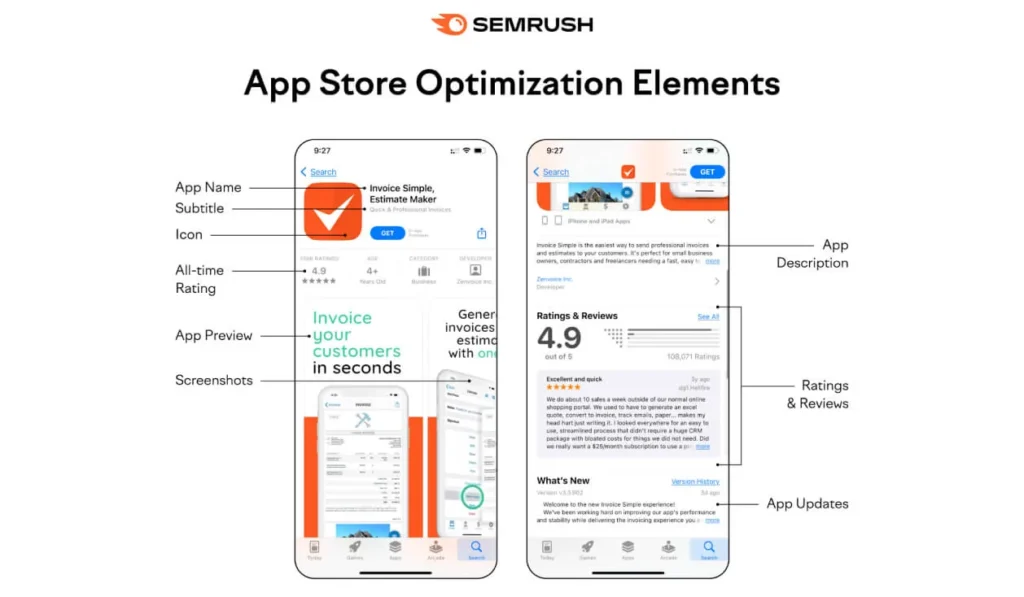
Title, subtitle, description and visual assets
Lead with the job, not the brand. A title that pairs the brand with the core use case will usually outperform a bare brand name for anyone who has not heard of you.
Google’s own store listing guidance is explicit about what not to include: no claims of ranking or awards such as “#1” or “App of the year”, and no price or promotional text such as a discount percentage. These rules apply to every translation of the listing, which is a common source of rejections for teams localizing in bulk.
Screenshots, preview video, ratings and reviews
The first two screenshots do most of the work, because many users decide without scrolling. Each one should communicate a single benefit in a caption readable at thumbnail size, not a raw interface capture.
Apple allows up to ten screenshots and three app previews per device size and language, so there is room to tell a sequence — see the App Store Connect requirements for formats and limits.
Ratings are a conversion asset, not a vanity metric. Prompt for a review after a successful task rather than on launch, and offer an accessible support channel to all users, and request an honest review after a meaningful product interaction. Reply to negative reviews: prospective users read the replies as evidence of whether problems get fixed.
Olga Kilimistaya
Base Team Lead (Social Team) at adskill
Custom product pages and localized store assets
Both stores now support alternative versions of a listing, and this is where ASO and paid campaigns meet directly.
On the App Store, custom product pages are alternative versions of your listing, each with its own URL. What differs and what is inherited is fixed:
They began as an ads feature and, following Apple’s 2025 updates, can also surface in organic App Store search when keywords are assigned to them. That makes them useful for matching creative to a campaign message and for testing variants before promoting a winner to the default page.
On Google Play, custom store listings serve a different page based on country, language, acquisition source, keyword or a unique listing URL. Text and creative assets can differ per listing, while contact details, privacy policy and category are shared across all versions, and each country can be targeted by only one custom listing at a time.
Localization is more than translation. Currency, examples, social proof and cultural references all affect whether a screenshot reads as relevant. Localize the top markets properly rather than every market superficially.
Choose Acquisition Channels by Goal
Which channels are best for app user acquisition? Choose by intent and category. Store search and Apple Ads capture existing demand. Google App Campaigns and in-app networks scale volume across placements. Creators and communities build trust for products that need explanation. The right mix depends on your budget, your category and what you can measure.
| Channel | Best use case | Required asset | Primary KPI | Common risk |
|---|---|---|---|---|
| Apple Ads | Capturing iOS search intent | Strong metadata, custom product pages | Cost per activation | Optimizing to installs, ignoring post-install value |
| Google App Campaigns | Scaled volume across Google surfaces | Diverse text, image and video assets | Cost per in-app action | Limited control over placement mix |
| In-app ad networks | Reaching users inside similar apps | Playables and video creatives | ROAS by source | Traffic quality and ad fraud |
| Paid social | Demand creation and broad reach | Native-feeling video, fast iteration | Cost per activation | Creative fatigue, rising frequency |
| Creators and communities | Products needing explanation or trust | Briefs, tracking links, promo codes | Assisted installs, code redemptions | Hard to attribute, variable delivery |
| Website, content and email | Owned demand and re-engagement | Landing page, deep links, lifecycle flows | Visit-to-install rate | Slow to compound, needs upkeep |
Apple Ads and Google App Campaigns
Apple renamed Apple Search Ads to Apple Ads in April 2025, and the change was more than cosmetic: the platform now spans several App Store surfaces rather than the single top-of-search slot the old name described. Campaign creative is built from your store assets, which is why listing quality directly limits paid performance.
Google App Campaigns work differently. You supply assets and a goal, and the system assembles and places ads across Search, YouTube, Display and Google Play. The lever you control is asset diversity and the conversion goal you optimize towards, not manual placement. Google’s own bid strategy documentation separates target cost per install from target cost per action, and its campaign setup guidance recommends a budget of 10–15 times your target CPA when optimizing for in-app actions.
Optimizing towards in-app actions rather than installs is the single change that most often improves downstream quality, at the cost of a longer learning period.
One planning note for teams that also run search campaigns: Google is consolidating several older campaign types into its AI Max feature set during 2026, so review the migration notes for any account with legacy setups before the automatic upgrades land.

In-app advertising networks
In-app networks place your ads inside other apps and games. They reach people already comfortable installing software on their phone, which is why the format converts well for gaming and for consumer utilities. Formats range from banners and interstitials to rewarded video and playables.
The main networks in this space are:
We cover platform mechanics in more depth in our guide to working with Unity Ads.
The risk in this channel is traffic quality. Because inventory is bought programmatically across thousands of publishers, invalid traffic and misattributed installs are a real cost, not a theoretical one. Audit sub-publisher performance, watch for implausible conversion patterns and set exclusion rules early; we go through the practical detection methods in our article on preventing fraud in in-app advertising.
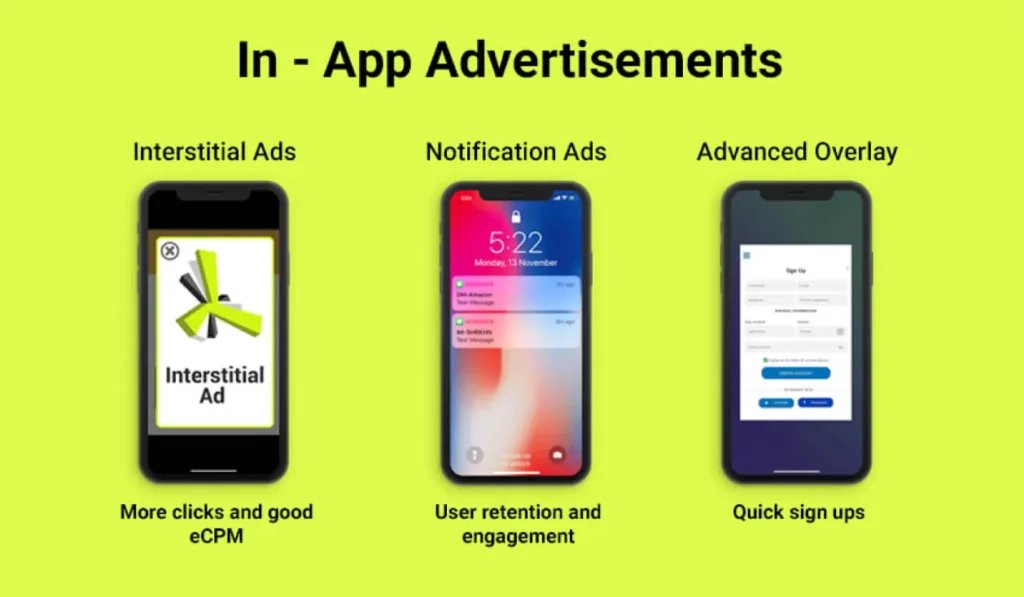
Creator, community and PR channels
Creators work when the product needs demonstration or endorsement rather than a feature list. Brief them on the problem and the audience, not on a script — content that reads as an advertisement performs poorly in every format.
Attribution here is partial by nature. Three things help:
Even with all three, some effect will show up as lift in organic installs rather than as tracked conversions.
Communities work on a longer horizon: participating where your audience already discusses the problem builds durable demand, but it cannot be switched on for a launch week.
Website, content and deep links
A product website earns search traffic your store listing cannot, and it is the only acquisition asset you fully own. It also gives you somewhere to send paid traffic that is not yet ready to install.
Deep links are the connective tissue. A user who taps a link to a specific screen and lands on a generic home screen is a user you paid for and lost. Three paths have to be tested separately, because they fail in different ways:
Email and lifecycle messaging are the cheapest re-engagement you have: a lapsed user is usually easier to bring back than a new one is to acquire.

Measure What Happens After the Install
What metrics matter after an install? Track the activation event that proves value, then retention at days 1, 7 and 30, then revenue events such as purchase or subscription, and compare all of it against acquisition cost. Install counts on their own cannot tell you whether a channel is profitable.
Attribution, deep links and event taxonomy
On iOS, attribution runs through Apple’s privacy frameworks. On iOS, privacy-preserving attribution may involve AdAttributionKit, SKAdNetwork, or both, depending on the ad network’s integration; as of 2026 Apple has not announced a deprecation timeline, and the two are designed to coexist. In practice, most measurement problems teams report are configuration problems: conversion value schemas left on old versions, or postback windows that do not match the business cycle.
Define your event taxonomy once and apply it everywhere:
The names must match across the SDK, the ad platforms and your internal analytics, or channel comparison becomes guesswork.
CPI, CAC, activation, retention, ROAS and LTV
What is the difference between CPI and CAC? CPI is the cost of an install. CAC is the cost of acquiring a customer or another defined valuable user, so it accounts for what happens after the install. A channel can have the lowest CPI in your account and the worst CAC.
How do I measure whether app promotion is profitable? Compare cohort revenue against acquisition cost over a fixed window — 7, 30 or 90 days depending on your monetization model. If early ROAS is below target, the fix may be creative, targeting, onboarding or pricing, so diagnose before reallocating budget.
LTV estimates are useful for planning and dangerous for daily decisions: early-cohort projections carry wide error bars, so treat them as a range and revisit them as cohorts mature.
Creative and landing-page testing
How long does it take to test an app marketing channel? Long enough to accumulate meaningful post-install data, which usually means several weeks rather than several days. Define the test budget, the success metric and the decision date before launching, so the test ends on evidence rather than on impatience.
Test one variable at a time — hook, format, or audience — and keep a record of what ran and when. Creative decay is the normal state in paid social and in-app networks, so a pipeline of new concepts matters more than one winning asset.
Store page tests deserve the same discipline. On the App Store, custom product pages let you validate a creative direction on paid traffic before applying it to the default page that every organic visitor sees.
A 90-Day Mobile App Promotion Plan
How do I promote an app with a small budget?
Sequence rather than spread. Spend the first month on ASO, tracking and owned assets, which cost time rather than media budget, then run one or two small paid tests with a defined success metric. A small budget spread across five channels produces no conclusive data on any of them.

Base Team Lead (Social Team) at adskill
| Period | Focus | Outcome at the end of the stage |
|---|---|---|
| Days 1–30 | Foundation and tracking: audience definition, conversion event, store metadata and creative, SDK and attribution, deep links, event taxonomy, consent flows | Everything measurable before any meaningful spend |
| Days 31–60 | Test channels and creative hypotheses: two or three channels, defined test budget each, three creative concepts per channel, weekly review of post-install data | Comparable data on which channels reach and retain your audience |
| Days 61–90 | Scale winners and stop inefficient campaigns: raise budget on validated combinations, expand adjacent audiences, refresh creative, cut what has not met its metric | A repeatable acquisition loop with a known cost per activation |
If nothing has produced a repeatable result by day 90, the problem is more often the product-market fit of the offer or the onboarding than the channel selection. More budget will not resolve it.
Another Way To Promote The Telegram Channel
Common App Promotion Mistakes
Most of these are sequencing errors rather than execution errors, which is why they are expensive: they are usually discovered after the budget has been spent.
| Mistake | What it leads to | What to do instead |
|---|---|---|
| Spending before tracking is in place | Installs you cannot evaluate or compare | Validate SDK, events and deep links first |
| Optimizing campaigns to installs | Cheap installs, weak revenue | Optimize to activation or purchase events |
| Running paid traffic to a weak listing | Higher cost per install across every channel | Fix metadata, screenshots and ratings first |
| Testing five channels on a small budget | No channel reaches significance | Sequence tests, one or two at a time |
| Judging a test after a few days | Decisions made on noise | Set the decision date and metric in advance |
| Ignoring sub-publisher quality in-app | Budget lost to invalid traffic | Audit sources, set exclusions early |
| Localizing by translation only | Assets that read as irrelevant | Adapt currency, examples and social proof |
How to Promote an App Without Relying Only on Paid Ads
How can I promote an app without relying only on paid ads? Build the channels you own: ASO, a product website, content, community, partnerships and referrals. These are not free — they cost time and require genuinely useful assets — but their effect compounds instead of stopping when the budget does.
The practical sequence is:
Paid channels then amplify a system that already works rather than substituting for one.
When to Involve an App Growth Partner
Running app promotion in-house is entirely feasible, and for a single market with one or two channels, it is usually the right choice. The calculation changes when you hit specific operational limits:
At that point, the value of a partner is access and operational speed, not secret tactics. If someone promises guaranteed rankings or a fixed cost per install before seeing your product and data, that is a reason to walk away.