Unity Ads sits on both sides of the mobile advertising market at once. Advertisers use it to acquire players, publishers use it to earn revenue from the very same inventory, and both groups meet inside one ecosystem. That dual role is exactly what makes the platform confusing to newcomers.
The name covers an ad network, a user acquisition dashboard, a monetization SDK, and, through Unity LevelPlay, a mediation layer. Each of them has its own setup path and its own definition of success.
In this guide we separate those parts, show which one fits your business goal, and explain how to prepare a launch in 2026, including the integration change that publishers with legacy Unity Ads code need to plan for this year.
What Is Unity Ads?
Unity Ads is the mobile advertising platform operated by Unity Technologies. Advertisers use the Unity Ads User Acquisition dashboard to buy installs and post-install events in mobile games and apps.
Publishers use the Unity Ads SDK to show rewarded, interstitial, banner, and playable ads inside their own products. Unity
LevelPlay is the separate mediation platform that manages competition between the Unity Ads network and other demand sources.
The first thing to clear up: Unity Ads is not the Unity game engine. They belong to the same company and integrate conveniently, since Unity developers can install the ads packages straight from the Package Manager. The ad platform, however, is a standalone business. Apps built outside Unity can integrate the SDK for iOS and Android and use the same feature set.

Источник: Unity
For most studios the platform shows up in one of three roles, and mobile game monetization is only one of them:
Most of the confusion around this topic comes from treating those jobs as one setting. They are three configurations, in different dashboards, with different KPIs. If in-app networks are only one part of your growth mix, it is worth reading our overview of how to promote mobile apps first, and then returning to platform-level decisions.
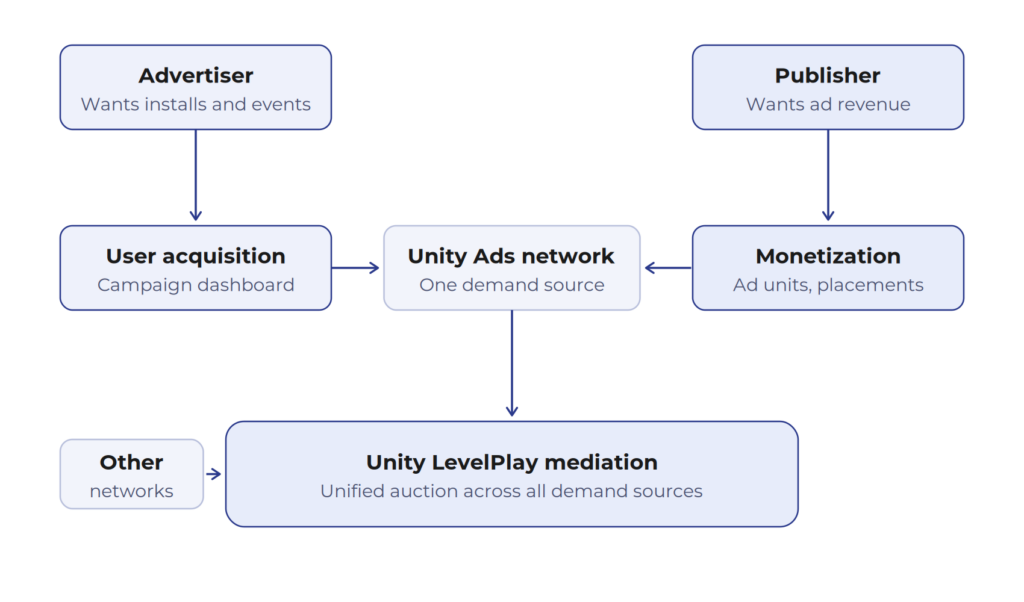
How user acquisition, monetization, and mediation relate inside Unity Ads
Unity Ads, LevelPlay, and Mediation: What Is the Difference?
In short: Unity Ads is a demand source, an ad network that buys and sells impressions. Unity LevelPlay is a mediation platform that decides which network, Unity Ads included, gets to serve each impression. An advertiser buys through Unity Ads. A publisher can monetize with Unity Ads alone or place it inside LevelPlay mediation alongside other networks and bidders.
Unity Ads for user acquisition
Unity currently supports four main User Acquisition campaign goals: Cost per Install (CPI), Return on Ad Spend (ROAS), Event Optimization, and Creative Testing. Event Optimization campaigns can target three event types: Level Complete, Payer, and Retention. ROAS campaigns can optimize toward in-app purchase revenue, ad revenue, or a combination of both. Some optimized campaign types require sufficient post-install event data before Unity’s models can optimize delivery effectively, so launch plans should account for a learning period rather than evaluating performance from day one. Targeting options include app source, locale, device, and app category, while creatives are reviewed against Unity’s advertising content policies before delivery.
Unity Ads Monetization for publishers
On the publisher side there are two objects that are easy to mix up.
An ad unit is the configured advertising object: a rewarded, interstitial, or banner unit tied to a platform.
A placement is the specific context in your app where that ad appears, such as the end of a level, the in-game store, or a pause screen. Unity documents both objects separately, in the ad units and placements guides. Rewarded placements can carry their own reward type and amount, and rewarded and interstitial placements can carry their own capping and pacing rules.
Placements can also be configured as waterfall placements or bidding placements, depending on whether the inventory is sold at manually set price targets or through a real-time auction.
Unity LevelPlay and mediation
LevelPlay is the mediation platform from Unity. It gives publishers a unified auction across SDK networks and bidders, real-time reporting, A/B testing of the ad strategy, and ad quality controls.
For Unity projects, LevelPlay is installed through the Ads Mediation package in the Package Manager, together with a dependency resolver such as the Mobile Dependency Resolver or EDM4U.
Setup then moves to the LevelPlay dashboard: register the app, create ad units, and save the App Key and Ad Unit IDs that the SDK needs. LevelPlay uses an App Key rather than the legacy Game ID, and it creates reusable ad instances instead of the old static Advertisement calls.

One ad request, several demand sources competing in the LevelPlay auction
| Layer | What it does | Who configures it | Where |
|---|---|---|---|
| Unity Ads, advertiser side | Buys impressions in other apps to acquire users | UA manager, growth marketer | Unity Ads User Acquisition dashboard |
| Unity Ads, publisher side | Sells your app inventory to advertisers on the network | Publisher, monetization manager | Unity monetization dashboard: ad units and placements |
| Unity LevelPlay | Runs a unified auction across Unity Ads and other networks and bidders | Publisher, ad ops | LevelPlay dashboard plus Ads Mediation package |
Which Unity Ads Path Should You Choose?
Pick the path from the business goal, not from the product name. The table below is the shortest honest version of that decision.
| Business goal | Recommended path | Primary KPI | What to verify first |
|---|---|---|---|
| Acquire new users | User acquisition campaign | Cost per valuable event, ROAS | Attribution, events, creative assets |
| Monetize a game or app | Unity Ads Monetization | ARPDAU, eCPM, retention | SDK integration, placements, consent |
| Increase demand competition | LevelPlay mediation and bidding | Revenue per impression, fill rate | Adapter setup, auction configuration |
| Test creatives | Creative testing campaign | CTR, install rate, downstream event quality | Comparable audiences and budget |
A publisher who wants both revenue and growth will eventually run two of these paths in parallel. They should still be planned, budgeted, and measured separately. Blending them into one Unity Ads project is the most common source of unreadable results.
The mistake we see most often is not a wrong bid or a weak creative. It is one team treating acquisition and monetization as a single Unity Ads setting. Once you split them into two plans with two owners and two sets of metrics, most of the arguments about performance simply disappear, because everyone can finally see what a given number is responsible for.
Base Team Lead (Social Team) at adskill
Ad Formats and When to Use Them
Unity Ads supports rewarded, interstitial, banner, and playable formats. Playables are not a separate ad unit type in the same sense as the others: they are interactive creatives that can run inside rewarded and interstitial units.
Rewarded video is usually the right format for a voluntary value exchange, where the user chooses to watch and receives something concrete in return. It suits energy refills, continues, revives, currency top-ups, and store offers. It is not automatically the highest-earning format in every app, because that depends on your demand, geography, and how often the reward is genuinely useful.
| Format | User scenario | Suitable placements | Primary metric | UX risk |
|---|---|---|---|---|
| Rewarded Video | Voluntary value exchange for rewards | Store, game over, energy refill | Engagement rate, ARPDAU | Broken reward flow |
| Interstitial | Natural session breaks/transitions | Level transitions, exit screens | Imp/DAU, Retention | High churn risk |
| Playable | Interactive preview of products | Inside Rewarded/Interstitial units | Post-install event quality | Long load times |
| Banner | Passive, non-intrusive inventory | Menus, settings, lobbies | Revenue per active user | Accidental clicks |
Launching a Unity Ads User Acquisition Campaign
Before a Unity Ads campaign goes live, you need several components in place. This includes an advertiser account, an organization budget, and an attribution setup that reports installs to Unity. You also need defined post-install events for optimized goals and moderated creative packs. Finally, ensure you have a country list with bids, campaign and daily budgets, and a documented consent flow. Missing any one of them turns the first weeks of spend into unusable data.
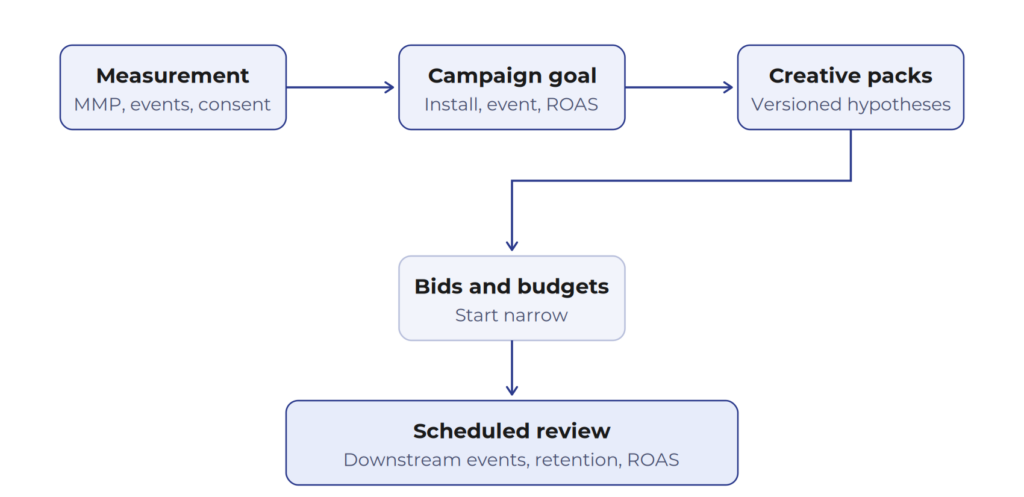
Launch sequence for a Unity Ads user acquisition campaign
Prepare measurement before launch
Unity needs to know when an ad resulted in an install. That information is passed through attribution links, either via a mobile measurement partner (MMP) or a custom server-to-server integration. Campaigns that optimize toward value, meaning ROAS and Event goals, additionally require post-install event data, and Unity documents specific eligibility criteria for the event data needed to run them.
Three things are worth checking before you commit budget:
Consent handling belongs to measurement, not to legal paperwork at the end. If your app operates in the EU, in US state privacy jurisdictions, or is child-directed, the consent signal you collect determines what data you may share and therefore what your campaigns can optimize against. Traffic quality checks belong here too: our guide on preventing fraud in in-app advertising covers the signals worth monitoring from the first day of spend.
Define the campaign goal
The four Unity goals map onto four different business models:
| Goal | When | What it needs |
|---|---|---|
| Installs | You need volume at a controlled cost, or you have no reliable post-install signal yet | Bids per country, manual or automated bidding |
| Event | Value is expressed as an in-app action such as registration, tutorial, or purchase | A clean post-install event with sufficient volume |
| ROAS | Value is revenue, from in-app purchases or ad revenue | Revenue events, an optimization window, and a learning period |
| Creative Testing | You need to compare creatives rather than scale | Comparable audiences and equal budget exposure |
Choose the goal your app can actually feed with data. A ROAS goal on an app with sparse revenue events will optimize on noise.
Build creative packages
A creative pack is the set of assets, including video, playable, and end card, that forms the ad a user sees. Treat every pack as a written hypothesis with five fields: audience, message, visual hook covering the first two seconds, call to action, and version number. Without the version field, creative-level reporting becomes impossible to interpret three weeks into the campaign.
Plan for moderation time as well. Creatives enter a queue and are reviewed against Unity content policies before they can deliver.
Test, learn, and scale
Integrating Unity Ads for Monetization
The setup order is stable. First, install the ads package in your project and register the app in the dashboard. Next, create ad units for the formats you want and define named placements for the contexts where ads appear. Then, set capping and pacing and wire the consent flow. Finally, validate the integration in test mode before going live. For new Unity projects in 2026 the recommended route is the Ads Mediation package for LevelPlay rather than direct legacy integration.
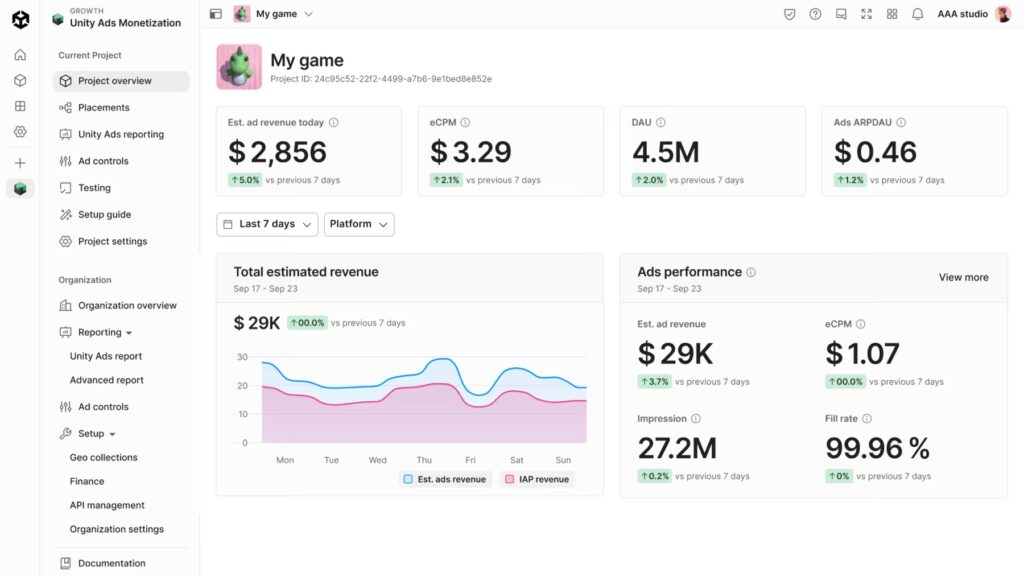
Источник: Unity
SDK and placement planning
Map placements to your session loop before you touch code. A workable placement map for a mid-core game looks like the anonymized example below.
| Placement name | Format | Trigger | Capping and pacing |
|---|---|---|---|
| LevelComplete_Rewarded | Rewarded | Optional bonus after a level | No cap, reward once per level |
| Revive_Rewarded | Rewarded | Game over, continue offer | Limited per session |
| NextLevel_Interstitial | Interstitial | Between levels, never before the first one | Capped per day, minimum interval between shows |
| Store_Banner | Banner | Store and settings screens | Refresh interval set in the dashboard |
Naming matters more than it might seem, because placement names are what your reports are grouped by later.
Test integration and privacy flow
Build the app and keep it in test mode until you deliberately disable that in the dashboard. LevelPlay provides an integration Test Suite for verifying that each network is configured correctly, plus a validation call that checks packages and dependencies. Test the ad flow and the consent flow together, including what happens when a user declines.
The regulation settings documentation describes the available APIs. For GDPR, recent LevelPlay SDK versions can receive consent collected by Google UMP or another CMP and pass it to supported networks.
US state privacy laws are handled through do-not-sell signaling, and child-directed apps must be flagged in the dashboard, with the app-level or user-level treatment decided together with legal counsel.
In the EU, consent may be required before an advertising SDK stores or accesses information on a user’s device, unless an applicable exemption applies. Confirm the implementation with your CMP provider and legal counsel.
Set frequency and pacing rules
According to the Unity guide on capping and pacing, capping limits how many ads you serve, while pacing limits the interval between them. Both can be set at ad unit level, at placement level, or at both, and when both are set the stricter rule applies.
Unity documentation is blunt about the fact that capping and pacing can reduce revenue, which is precisely the point: you are buying retention with impressions. Frequency capping is the single setting that most often decides whether a monetization change survives its first month, so it should be tested, recorded, and revisited rather than left at a default that somebody picked eighteen months ago.
Monitor monetization without harming retention
Watch monetization metrics and experience metrics on the same screen. If ARPDAU rises while D7 retention and session length fall, you have moved revenue forward in time rather than created it.
Useful guardrails: a maximum impressions-per-DAU figure that you will not exceed without a test, a cohort comparison after every frequency change, and a review of which placements actually produce the revenue. Often a small number of them carry most of it, and the rest are pure UX cost. The question behind all of these checks is the same: does the extra impression add more than it takes away from player LTV?
Metrics That Matter
Reporting is where the split between acquisition and monetization becomes practical rather than theoretical. The two sides of Unity Ads answer different questions. Acquisition asks how much a valuable user costs and whether that user stays. Monetization asks how much each session is worth and how much experience you traded for it. A dashboard that mixes both produces averages nobody can act on.
It helps to keep two separate scorecards and to name an owner for each. Below is the minimum set worth tracking, with the trap that usually sits behind each number.
For user acquisition:
| Metric | What it tells you | Watch out for |
|---|---|---|
| Install rate | Creative and store page efficiency | A high rate with poor retention means the ad oversold |
| Cost per install (CPI) | Entry price of a user | Never a verdict on its own |
| Cost per event | Price of a valuable action | Meaningful only if the event is correctly instrumented |
| Event completion rate | Whether acquired users reach value | Falls first when creative and product diverge |
| D1 and D7 retention | Quality of the cohort | Compare with organic and other channels |
| ROAS | Revenue returned per unit of spend | Needs an agreed measurement window |
| Creative-level performance | Which hypothesis works | Requires disciplined creative versioning |
For monetization:
| Metric | What it tells you | Watch out for |
|---|---|---|
| Impressions | Ad supply actually delivered | Rising impressions with flat revenue is a demand problem |
| Fill rate | Whether demand meets your requests | Varies by geo and format |
| eCPM | Price per thousand impressions | A high eCPM on tiny volume is not a strategy |
| ARPDAU | Revenue per daily active user | The headline monetization number |
| Ad revenue | The absolute outcome | Segment by placement, not only in total |
| Session length | Experience health | Early warning of over-monetization |
| Retention | Long-term revenue capacity and LTV | The metric that pays for everything else |
| Frequency | Ads per user per session | The lever most often set too high |
| Churn signals | Where users leave | Cross-reference with placement triggers |
One rule covers both tables. A single metric improving does not mean the campaign succeeded. If CPI drops while D7 retention drops with it, or if ARPDAU rises while sessions shorten, you have traded quality for a number.
Common Mistakes
Most failed Unity Ads launches do not fail on the platform side. They fail on decisions made before launch, in the way goals were framed and measurement was prepared. The list below collects the errors we see most often in audits of accounts that stopped performing, and every one of them is cheaper to prevent than to diagnose afterwards.
Unity Ads Launch Checklist
The steps below compress everything above into a working order for a marketer or product manager.
Not every point applies to every project, since acquisition and monetization use different halves of the list. However, the sequence is deliberate: access and measurement come first, creatives and budgets second, and the review dates last, because a launch without a scheduled review turns into a campaign nobody is responsible for.
Conclusion
Unity Ads remains one of the core platforms for mobile games, but in 2026 it is best approached as three separate decisions rather than a single product choice.
Decide whether you are buying users, selling inventory, or managing demand competition, build the measurement that this decision requires, and verify format and frequency choices against retention instead of assumption. Any published figures about reach, engagement, or format performance are worth checking against current Unity materials before they inform a plan.